







 Tiếng Việt
Advanced Uxbuilder for flatsome
Enable Image Hover
The Image element in Flatsome’s UX Builder already provides many powerful options. However, during interface design, when you need to hover over an image to display another image to enhance user experience (UX), the current default functionality does not support this directly.
Normally, to achieve this effect, you have to:
- Use two separate Image elements
- Combine them with custom CSS to handle the hover effect
This approach is not too difficult for developers, but it can be complicated and hard to access for users who are not familiar with coding.

Solution: Enable Image Hover
Enable Image Hover is a feature developed by Nguyen Lan to add hover image functionality directly to the existing Image element, allowing you to:
- Add one hover image directly to the Image element you are using
- Apply 15 different hover effects
- No need to write CSS
- No need to recreate elements
https://www.youtube.com/watch?v=dmKbvDThBBw[/embed
]
How to use
To enable this feature, simply:
- Open UX Builder
- Go to Advanced Utilities
- Navigate to Image
- Enable Enable Image Hover
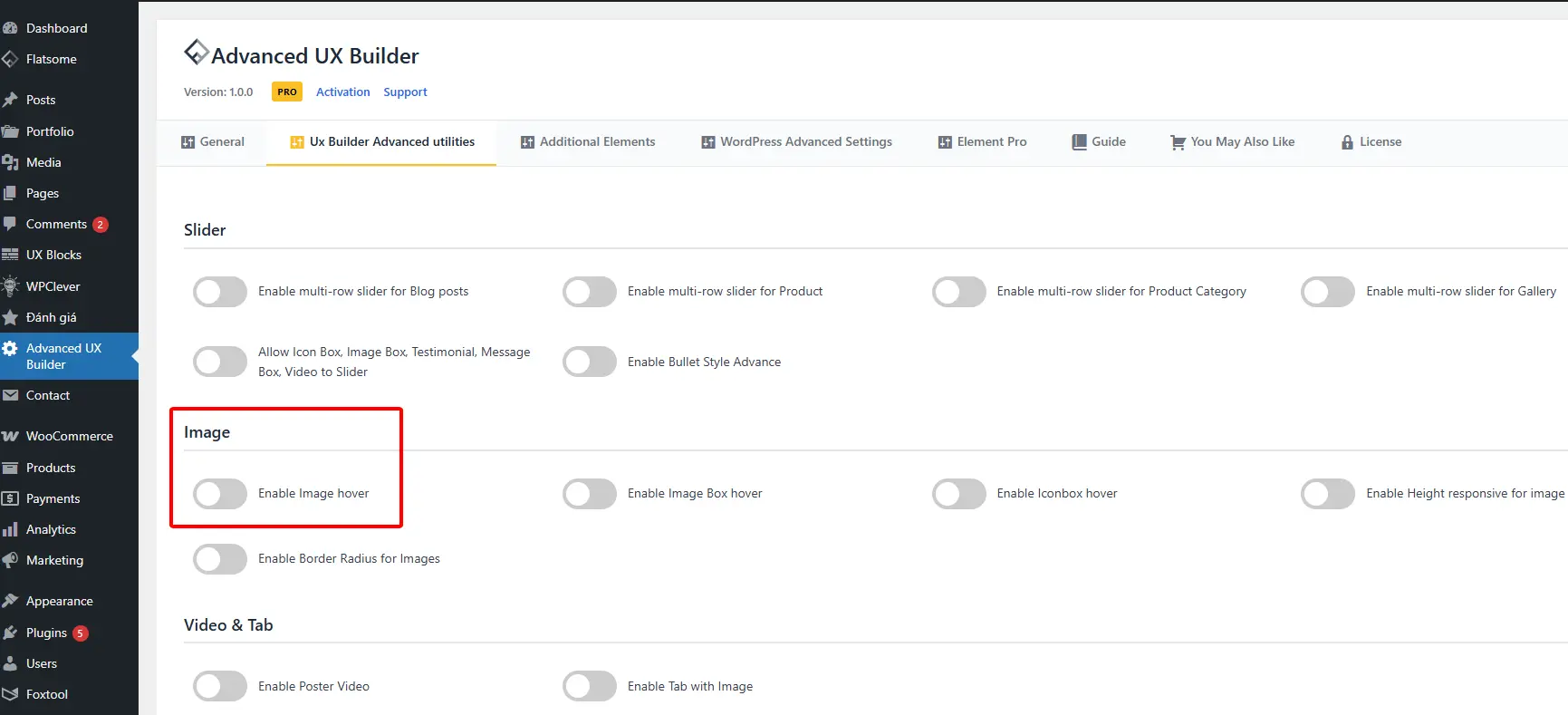
Immediately, in the Image element you are using, you will see:
- A field to upload the hover image
- A list of hover effects to choose from
No override – Instant application
Enable Image Hover does not override Flatsome’s shortcode. Therefore:
- The feature is applied instantly
- Works with all Image elements previously designed
- No need to edit or recreate layouts
👉 This is an optimal solution to enhance UX, save design time, and keep your interface professional while remaining simple to use.